When a Mini Metro station starts overcrowding, check three things: can its passengers reach the shape they need, how long are they waiting for a useful train, and does that train have room? Those questions help you choose between changing a connection, adding service, and adding seats.
This guide focuses on Normal mode on Android and iOS. It combines published mobile reviews, developer documentation, and our reading of the licensed map image above; Games Ranker has not tested these changes in a live run. For the buying decision and mobile limitations, see our Mini Metro review.
Trace the destination before changing the line
A passenger’s small symbol tells you the station shape they want to reach. A triangle passenger needs a triangle station, even if they are waiting at a circle. They can transfer between lines along the way, as Shaun Musgrave explains in his TouchArcade review.
Start with one crowded station and one of its waiting symbols. Follow the line to a matching destination, checking any transfers. A connection drawn through several circles may look busy and well served while offering no direct stop for those triangle passengers.
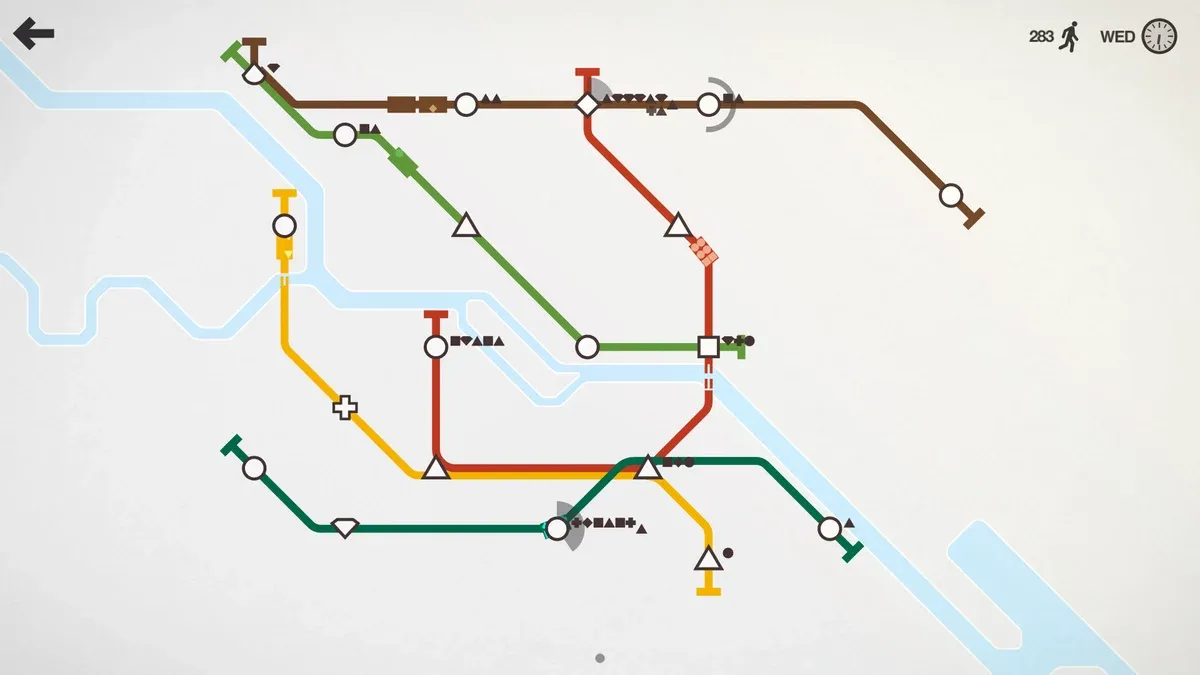
The historical promotional screenshot above makes a useful map-reading exercise:
- Find the brown line across the top. It joins several circles, a diamond, and the unusual station at its left end, but no triangle.
- Look at the diamond where brown meets red. This is a transfer point.
- Follow the red line down to its triangle station. That gives passengers on the brown line a way to reach the shape they need.
The pictured network already has a connection for those passengers. Adding a triangle stop to brown is therefore only one possible response, not proof that the original route is broken. The next question is whether trains can move the queue through that transfer quickly enough.
A still image cannot show arrival frequency or prove why a train left someone behind. Use it to practice tracing a journey, then watch that journey in your own run.
Watch an arrival and choose what to change
If the station is already close to ending your run, pause to inspect the network first. Otherwise, watch a useful train arrive, note how much room it has, and follow the passengers toward their destination or transfer.
| What you observe | What to inspect | A change to consider |
|---|---|---|
| You cannot trace a connection to the waiting passengers’ destination shape | A missing destination or transfer | Reroute a line or connect it to a line serving that shape |
| A useful train has room, but the queue rebuilds during a long gap | The route length and spacing of service | Shorten an unnecessary detour or add a locomotive where allowed |
| Useful trains repeatedly arrive full and leave a queue | Seats available on this part of the journey | Add a carriage, or use another train or route to share the load |
These are checks, not guaranteed diagnoses. A full train can also be carrying passengers along an unnecessarily indirect route. Extra seats may help immediately while a better connection addresses the longer journey.
Pay special attention to the next transfer. In the screenshot example, emptying the brown-line circle into the diamond is not enough if the red line cannot take those passengers onward. Watch both queues before calling the change successful.
Make one edit, then let the service respond
Pause, trace the overloaded journey, and make the smallest change that addresses it. Campbell Bird’s 148Apps mobile review describes pausing to manage the network and notes that redrawn service can finish its existing trip before adopting the new route. Do not judge an edit solely from the first moment after drawing it.
On a phone, enlarge the busy part of the map before making a precise edit. Dinosaur Polo Club documents pinch zoom and panning in its mobile design notes. Check the rest of the route afterward so a local fix does not leave another station disconnected.
Resume and compare the problem station with its next transfer over several arrivals, if the warning allows. Did the original queue shrink? Did the receiving station remain manageable? Changing several lines and moving all the trains at once makes it harder to see which decision helped.
Choose upgrades for the queue you actually have
A carriage adds passenger space to a train; another locomotive adds a separate train to the service. New lines and river crossings solve different network constraints. Christian Valentin’s Pocket Gamer mobile review describes the pressure of choosing among limited upgrades as the city grows.
Before accepting an upgrade, name where you would use it. “The train reaches this circle full” gives a carriage a concrete job. “Passengers cannot reach that shape across the river” makes you check the connection and available crossings first.
Avoid an automatic rule such as always taking carriages or always extending the longest line. An extension can connect an essential new station while also lengthening the trip for everyone already using that service. Recheck the stations you were keeping stable before the extension.
Practice the transfer without a Normal-mode deadline
If the same pattern keeps defeating you, reconstruct a small version in Creative mode: a line with circle stations, a shared transfer, and a second line reaching a triangle. Dinosaur Polo Club’s Creative mode documentation confirms that you can reshape stations, control how busy they become, and use unlimited locomotives and carriages. Experiment with one change at a time, then return to Normal to practice with limited resources.
For the September 10, 2026 check, the US App Store listing showed version 1.55; its latest release notes described backend changes without gameplay changes. Both that listing and Google Play advertised Creative mode. Google’s public page did not expose an exact Android version, so this is a general network-planning guide rather than a build-specific touch-control walkthrough. The route-redrawing advice also does not apply unchanged to Extreme mode, where established lines are permanent.
Sources
- Mini Metro US App Store listing and version history
- Mini Metro US Google Play listing
- Dinosaur Polo Club: mobile controls and screen design
- Dinosaur Polo Club: Creative mode
- Shaun Musgrave, TouchArcade: Mini Metro review
- Campbell Bird, 148Apps: Mini Metro review
- Christian Valentin, Pocket Gamer: Mini Metro mobile review